
Rick Shaddock
TM Consultant |
TeleMagic Help
Sage CRM, SwiftPage
Washington, DC
1-202-829-4444
|
 |
Welcome to TeleMagicHelp.com dedicated to supporting and customizing TeleMagic for a wide variety of organizations
in the metro Washington D.C. area, and around the world!
TeleMagic has been purchased by Sage Software, called Sage
CRM in 1992, and is now owned by SwiftPage.com

Our Mission
Our mission is to help our clients serve their customers better through the effective
use of TeleMagic.
TeleMagic is the leading totally customizable contact manager designed to manage
contacts and activities across entire organizations. Click
here to download a fully working demo of TeleMagic.
To learn more about how TeleMagic can help your organization improve productivity, call
us or send an email to: Help@CICorp.com
Courses
TeleMagic Clean Up - a utility to
help you clean up your TeleMagic database
TeleMagic Enterprise Software General Features and Capabilities
Contact Management and user-customizable software that enables you to
build better relationships.
TeleMagic for DOS Versions 11 and
higher (single or multiuser)
TeleMagic for Windows Versions 1 and
higher (single or multiuser)
Convert fromTeleMagic
to your CRM of choice
Convert
to TeleMagic from your
current contact manager
TeleMagic Enterprise (Windows) General Features
|
GLOBAL POWER FEATURES.
 |
Designed for networks or stand-alone PC’s (includes record locking)
|
|
Three-level relational contact database
|
|
Full featured Activity Manager
|
|
Built-in fax capability
|
|
Wireless Messaging access integrated with e-mail, activities and the
Contact Manager
|
|
Built-in e-mail
|
|
Auto-dialer
|
|
Branch Scripting with activity history generation and input fields
linked to your contact records
|
|
Sales Forecasting, including links to contact records and extensive
reporting with graphs
|
|
Spell Checker
|
|
Custom and quick reports
|
|
Automation Server for dedicated print, fax, e-mail and wireless
message processing
|
|
Import and export using popular file formats
|
|
Mail merge integration with Microsoft Word¨, WordPerfect¨, WordPad¨
and WordPro¨
|
|
System and field-level security and password protection
|
|
Context-sensitive help
|
|
Record and system synchronization through Data Synchronization
Server with automatic packet transfer
|
|
Configurable toolbars
|
|
User-definable macros
|
|
TeleMagic contact import formats that include linked activities
|
|
Database Utility Program for system maintenance
|
|
Export to FoxPro, dBase III+, SDF, Delimited formats and
user-definable formats
|
|
Year 2000 compliant
|
FULLY CUSTOMIZABLE.
|
Add your own fields and decide the number, type, length, placement
and configuration
|
|
Field types include character, date, number, OLE, calculated, unique
number counter, phone, fax, wireless messaging, FTP, e-mail, web,
newsgroup, check box and notepad Easy-to-use Screen Designer to
customize how information is displayed
|
|
Multiple views for each level - customize how each user views
information
|
|
CONTACT MANAGER.
|
User-defined List Boxes allow rapid and consistent data entry
|
|
Data entry templates, default values, calculated fields and validity
checking for any field
|
|
Powerful record search capability
|
|
Editable Browse window
|
|
Browse list of pending activities
|
|
Duplicate record checking
|
ACTIVITY MANAGER.
|
Scrollable daily, weekly and monthly views
|
|
Reschedule and re-prioritize using “drag and drop”
|
|
Single-click check-off of completed tasks
|
|
Associate Contacts with Activities and To-Do’s
|
|
Assign and view status of tasks assigned to others
|
|
View and modify other users’ schedules (with permission)
|
|
To-Do display includes indication of time until or past deadline,
and completed items
|
|
Multi-day activity scheduling
|
|
Recurring activity scheduling
|
|
Scheduling conflict warnings
|
|
Automatically search for available time slots
|
|
Calendar security
|
|
Alarms with or without TeleMagic loaded
|
|
Activity Browse
|
|
Activity Archive
|
|
User-defined weekends and holidays
|
|
Group activity scheduling
|
|
Assign resources to activities
|
|
Reassign activities from one user to another user
|
|
Move groups of activities to a new time slot
|
|
Automatically create an activity for all contacts in a filter and
assign them to one or more selected users
|
|
Configurable Activity Views
|
|
WIRELESS MESSAGING.
Send Wireless Messages to
contacts or TeleMagic users, to all contacts in a filter, or to
everyone in a user group
Send messages from the local
workstation or from a dedicated server
Send Wireless Messages based
on activities
Maintenance screen for
messages sent locally
REPORT GENERATION.
|
Standard reports on various areas of TeleMagic, such as faxing and
sales forecasting
|
|
Activity reports including printout to popular “day planner” format
|
|
Envelope, label, and “rotary index” printing
|
|
Contact and Phone Lists
|
|
Quick reports for novice users
|
|
Configurable Reports Menu
|
|
Custom report writer including Report titles and summaries, Multiple
fonts, pitches and styles, Page orientation and size selection,
Calculated fields with input prompts, Full color illustration and
OLE support, headers and footers by page and group, and Print
Preview
|
WORD PROCESSING.
|
Supports Microsoft Word¨ 2.0, 6.0, 7.0, 97; Word Pro¨ 97;
WordPerfect¨ 6.0, 7.0, 8.0; WordPad¨
|
|
Base new documents on previously created templates
|
|
Share documents between users, or keep personal documents private
|
|
Link documents to contacts and create rollup lists of linked
documents on contacts’ records
|
|
View lists of documents printed or faxed to a contact
|
|
TeleMagic Enterprise General Features
|
E-MAIL.
|
E-mail application can run independently from TeleMagic
|
|
Works with your existing MAPI e-mail server or as a stand-alone
|
|
Link e-mail messages to contacts in your TeleMagic database
|
|
Create rollup lists of messages linked to contacts
|
|
Automatically link incoming messages to contacts
|
|
Include attachments, such as files and merge documents, with your
messages
|
|
Establish multiple e-mail accounts for each user
|
|
Record e-mail activities in the Activity Manager automatically
|
|
Send locally or process through Automation Server
|
|
Filters
|
|
User-defined folders
|
|
Extensive search
|
|
Address book
|
FAXING CAPABILITIES.
|
Fully integrated faxing system
|
|
Send immediate faxes to individual contacts or to all contacts in a
filter (broadcast or batch fax)
|
|
Include merge fields in all pages being faxed
|
|
Extensive fax preferences to customize faxing
|
|
Fax locally or from a dedicated server
|
|
Multiple servers and queues
|
|
Support for unlimited servers processing faxes, with up to eight fax
modems per server
|
|
Links with the Activity Manager and contact records for fax history
tracking
|
|
Fax TeleMagic reports
|
|
Fax maintenance for faxes sent locally
|
| Fax external documents generated in other applications
|
| Fax documents using any of the supported word processors and
automatically selects the correct word processor for each document
|
|
DATA SYNCHRONIZATION SERVER (DSS).
|
Unparalleled power combined with one-click synchronization provides
both flexibility and ease-of-use
|
|
Create unlimited remote and satellite sites - each with unique
settings
|
|
Easily change the record set any site receives
|
|
Only synchronize the data each site needs to see for maximum data
security
|
|
Control which fields in which records are included in
synchronization for any site
|
|
Synchronize Activities and activity permissions, Contact records,
Database structure changes, E-mail, Filters, Indexes, List boxes,
OLE fields, Preferences, Program updates, Screen design changes,
Security and Users
|
|
Powerful administrative assistance through DSS
|
|
Automatic program updates and upgrades to all sites
|
|
Changes to databases are automatically transferred and updated at
all sites
|
|
Maintain personnel for sites anywhere in the world from one central
location
|
|
Control security at the remote sites, even assign users to a group
remotely
|
|
Create user preferences in the central location and copy them to
users at remote sites
|
|
Update each field using pre-defined rules and further qualify the
selected field rule by creating a user-defined expression that
provides the user total control
|
|
Save data that is being replaced in any memo field
|
|
Create scripts to automate processing at the remote sites -
synchronization at remote sites is as simple as clicking an icon
|
|
Create servers at the central site to control what occurs when you
select to process
|
|
Have multiple servers processing simultaneously for high volume
synchronization
|
|
Set up continuous synchronization at the server - changes can be
exchanged between sites within minutes
|
|
Choose to automatically transfer packets using TeleMagic’s e-mail or
FTP transfer
|
|
STRATEGIC PARTNERS (Third Party
Products).
|
Links to numerous accounting applications
|
|
CTI integration and call center management
|
|
Receivable and inventory tracking
|
|
Bid and Proposal Order entry system
|
|
Candidate search and proposal generation for placement agencies
|
|
Newspaper and magazine template to assist sales and production of
ads
|
|
Planning guide for database design
|
|
Campaign Management
|
|
Real estate prospecting and contract management system
|
|
Sales Tracker
|
|
And More
|
SYSTEM REQUIREMENTS. Minimum
hardware requirements: IBM-compatible, Pentium 133 with 32 MB of RAM;
VGA screen with 640x480 resolution and 64 MB of free disk space.
Recommended: Pentium 200 with 64 MB of RAM and 64 MB of free disk
space.
OPTIONAL SUPPORT: Class 1 or 2
FaxModem or other serial-attached phone dialer. Printer access through
Windows printer setup. Wireless Messaging access to a carrier terminal
that supports modem transmission.
SOFTWARE: Microsoft Windows 98,
2000, XP Pro, Vista Pro, Windows 7
|
News
TeleMagic Enterprise for Windows V5 contains hundreds of
new features and enhancements. TeleMagic V4 Users with annual maintenance will
receive the V5 Upgrade beginning in August, 2001.
The latest release of TeleMagic's Internet Suite of products, allowing access to
TeleMagic Databases over the internet ... and more. Click here to learn more about
the TeleMagic Family of Products.
TeleMagic's NetClient and Web Browser access allows people in your company to access
your database over the internet, subject to security you control. The Prospect and
AutoResponder modules allows anyone on the internet to key their contact information
directly into a new record in your database, and to select materials to be automatically
emailed or faxed to them
TeleMagic NetClient
TeleMagic NetClient is a web-enabled, three-tier application consisting of the Client, the
TeleMagic Application Server (TMAS), and TeleMagic databases. Using the latest remote data
access technology, TeleMagic NetClient reads and displays the database structure and data
from TeleMagic. This means that your installation of TeleMagic can reside in Seattle and
be directly accessed by users in New York, London, Sydney, or anywhere in the world.
TeleMagic NetClient remote users are working in an environment that looks and behaves very
similar to TeleMagic itself.
Test drive the Browser Edition CRM module
|
At the login screen, enter "VIS" (without the quotes) in the User ID field.
There is no password. |
Test drive the Browser Edition Prospect
module
|
No user ID or password is required. |
For more information on TeleMagic NetClient, see the NetClient White Paper and the
NetClient Browser Edition FAQ.
TeleMagic Enterprise for Windows V5 contains hundreds of new features and
enhancements from Group Activity Scheduling to improved Word Processing/Document
Management.
Ask us to show you how TeleMagic can help your organization.
TeleMagic University Training
TeleMagic has certified several dozen consultants nationally as "TeleMagic
Authorized Training Centers." Ask us about customized on-site training classes
for your company. Classes include:
Introduction, Intermediate and Advanced TeleMagic
Training.
dBase Expressions
: A "super-advanced" FoxPro expressions class. A
must for database administrators who want to clean up or adjust their databases for
more marketing effectiveness.
Upgrading to V5
: A class designed to help experienced users of TeleMagic plan
the upgrade to V5 and take advantage of the new features-- New!!
Data Synchronization
: A special class on how to manage the integration of
remote sites with TeleMagic, whether they are branch offices with dozens of users or a
handful of remote sales people, or just one person who wants to work with the data a home
from time to time.
Why TeleMagic?
Customization:
Thousands of firms around the world use TeleMagic because it is the only database that
is fully customizable by an experienced end-user.
Ease of Use:
The ability to customize TeleMagic lets us design screens so that users only see the
fields they need to, in the sequence they need to. This makes what otherwise could be a
complex data entry process as easy as possible.
Ask us about some options designed for TeleMagic:
The ability to link multiple databases and more. By using this proven option that works
seamlessly with DataSynch, and with TeleMagic versions 3, 4, & 5, we are able to go
beyond TeleMagic's 3-level database structure. Just a few examples include separate
databases for Course Registrations, Products, Invoices, Billing Records, Fixed Assets, all
linked to each other and to contacts or companies. Effective use of this program enables
TeleMagic to be used to manage an entire enterprise, not just sales contacts.
Dynamic Filters
Allows filter specs to be entered on the fly, avoiding the need to program multiple
filters. Can also be used in reports.
More TeleMagic Options
:
Data Synch - to easily exchange data between remote
sites
Sales Track -
manages automated processes to
automatically manage sales prospects
Handheld PC Links
- link TeleMagic databases to the Palm and other handheld
PCs
Phone-Link
- Lets TeleMagic dial your phone and "pops" the screen
with inbound calls.
Help Desk
- A system designed specially to handle
customer service / help inquiries.
Merge-Magic
- Essential for importing and managing data files.
Accounting Interfaces
- for most popular accounting systems
R&R Report Writer
- a powerful reporting utility
Crystal Reports - another powerful reporting utility
Custom Screens - designing effective and easy to
use field layouts
Database Fixit - Pack and Reindex
Specialists in Relationship Management Software Systems to
track Customers, Prospects, Friends, Conversations, and To-Do Activities on
LAN's, Desktops, and Laptops
TeleMagic Help Resources
Help with TeleMagic on 64 bit Windows:
Telemagic.zoft80.se




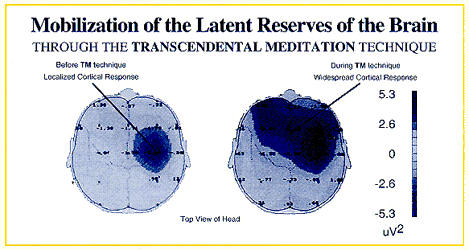
TM helps us achieve our full potential and is scientifically verified.
We can do the magic of converting your database to or from TeleMagic
the invention of Michael McCafferty,
cognized by the TM Guru himself.
See more about his company at
MichaelMcCafferty.com or DBLM.com


www.youtube.com/watch?v=4JNdO9B2sFQ