 GoldmineConvert.com
 GoldmineConvert.com
There are 3 basic steps:
1. COMPRESSING THE ACT! FILES
Compress the files for faster upload, using WinZip.
OR you can use PKZip.exe along with
the GoldZip.Bat batch program in
the Goldmine folder to compress the files you need automatically.
2. EMAIL YOUR GOLDMINE.ZIP FILE TO Convert@Cicorp.com
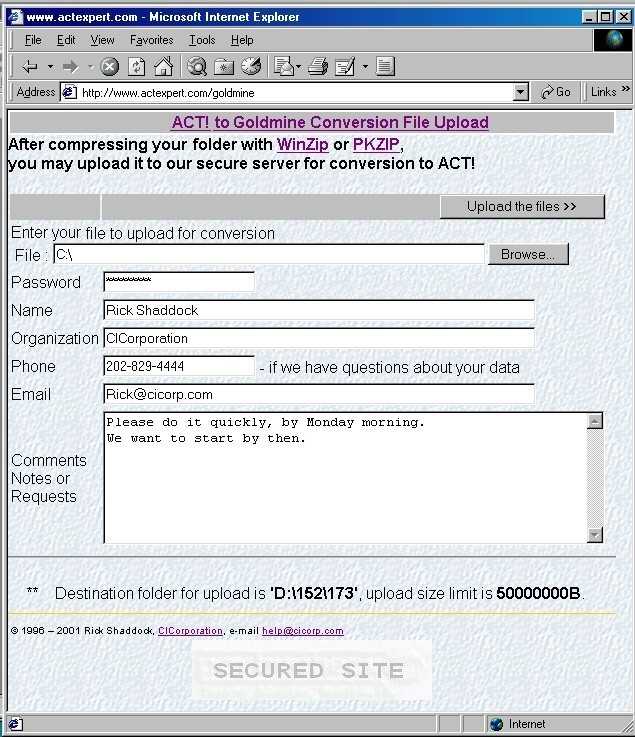
OR UPLOAD IT TO OUR SECURE SERVER
Send to a secure drive only we both can access
3. DOWNLOAD the FINISHED GOLDMINE FILE
When done, you can download the converted GOLDMINE file
Before compressing the ACT! database, there are a few considerations.
Goldmine can create sub contacts for companies with several employees.
But ACT! can only have one contact per record.
Please specify if you would like us to keep them as one contact per record, or if you
would like us to combine them by company or organization.
Some features of Goldmine have no direct equivalent in ACT! So you can look forward to having additional features available such as:
1. COMPRESSING THE ACT! FILES
See steps to compress the ACT! Database
2. EMAIL YOUR GOLDMINE.ZIP FILE TO Convert@Cicorp.com
or UPLOAD IT TO OUR SECURE SERVER
First we can simply try email to: Convert@Cicorp.com
Just send the Zip file as an attachment using your email program.
Large files (10 MB+) often do not transmit properly, if at all, through email.
Some organizations have a limit on the size of attachments you can email.
We suggest using our web based drive, which offers you up to 100 Megabytes of online
storage space.
If your file is larger than that, give us a call at 800-319-3190, so we can send you the FTP settings to upload it directly using an FTP program such as CuteFTP.
Enter your name, company, phone, and email, so we can contact you if there are any questions during the conversion. This will be the phone and email we will use to tell you when your data is ready.
For your protection, enter a password of your choice. We will use
this to encrypt the ZIP file. This is for your security. We want zero
chance that your data will accessed by anyone other than you.
3. DOWNLOAD THE FINISHED GOLDMINE FILE
When we are finished with the conversion, we will notify you of the location of your file. You can download it with any browser. For security reasons, it will be known only to you. The file will come as a Self-Extracting file, for your convenience. Then you can Download it and double click uncompress it into the GoldMine Database folder.
Files needed from the folders:
| Goldmine | GMBASE | Your data | |
| LICENSE.DBF USERS.DBF USERS.DBT USERS.MDX DATADICT.DBF DATADICT.MDX FLAGS.DBF |
CAL.DBF
CAL.DBT CAL.MDX FIELDS5.MDX FIELDS5.DBT FIELDS5.DBF FILTERS.DBF FILTERS.DBT FILTERS.MDX FORMS.DBF FORMS.MDX FORMS.DBT FORMSFLD.DBF FORMSFLD.DBT FORMSFLD.MDX FORMSQUE.MDX FORMSQUE.DBF GMTLOG.DBF GMTLOG.MDX GSLOGS.MDX GSLOGS.DBT GSLOGS.DBF GSSERVER.DBF GSSERVER.DBT GSSERVER.MDX GSSITES.MDX GSSITES.DBF GSSITES.DBT IMPEXP.DBF IMPEXP.DBT IMPEXP.MDX INFOMINE.DBF INFOMINE.DBT INFOMINE.MDX LEADDBFS.DBF LEADDBFS.MDX |
LOOKUP.DBF
LOOKUP.MDX MAILBOX.DBF MAILBOX.DBT MAILBOX.MDX OPMGR.DBF OPMGR.DBT OPMGR.MDX OPMGRFLD.MDX OPMGRFLD.DBT OPMGRFLD.DBF PERPHONE.DBF PERPHONE.MDX REPORT32.DBF REPORT32.DBT REPORT32.MDX REPORTS.DBF REPORTS.DBT REPORTS.MDX RESITEMS.MDX RESITEMS.DBT RESITEMS.DBF SCRIPTSW.DBF SCRIPTSW.DBT SCRIPTSW.MDX SPFILES.DBF SPFILES.MDX SYSLOG.MDX SYSLOG.DBT SYSLOG.DBF TRACKS.DBF TRACKS.DBT TRACKS.MDX USERLOG.MDX USERLOG.DBF |
Contact1.DBF
Contact1.MDX Contact1.DBT Contact2.DBF Contact2.MDX ContGrps.DBF ContGrps.MDX ContHist.DBF ContHist.DBT ContHist.MDX ContSupp.DBF ContSupp.DBT ContSupp.MDX ContTLog.DBF ContTLog.MDX ContUDef.DBF ContUDef.MDX |
We don NOT need the Goldmine software files, such as GMW5.EXE, or any DLLs.
The GoldZip.Bat file, placed in the Goldmine EXE folder, will get the proper files automatically.
Please feel free to call any time with questions.
Rick Shaddock
CICorporation.US
800-319-3190
202-829-4444
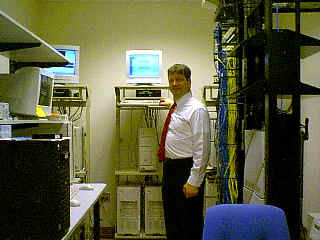
Data Commander Rick runs a conversion enterprise, transporting your data at warp speed.